

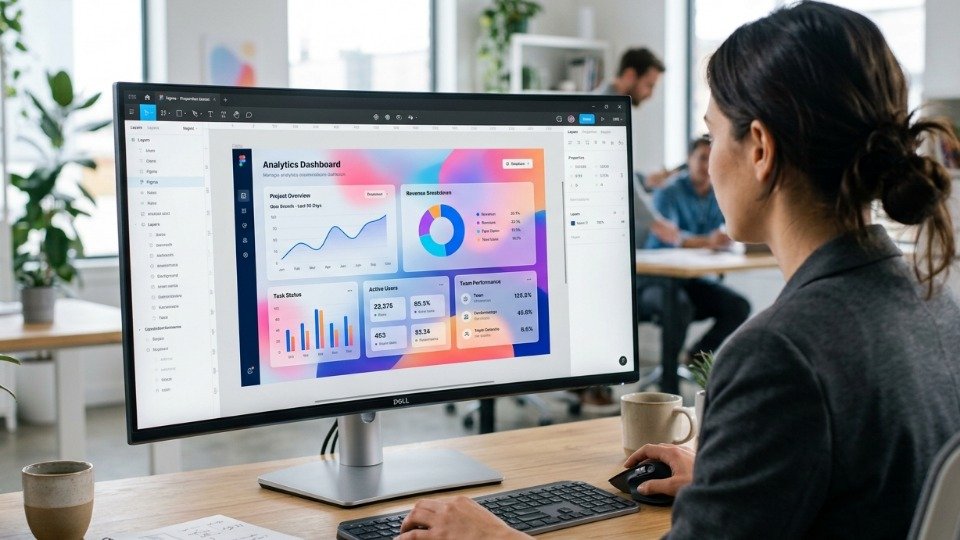
The Rise of Premium Glassmorphic Layouts
Modern interfaces are moving away from flat design. Incorporating translucent panels, subtle background blurs, and thin borders creates a premium, high-fidelity user interface that feels alive. This glassmorphism aesthetic offers visual hierarchy by simulating layers of glass floating over colourful backgrounds, creating a sense of depth.
"Good UI design balances aesthetics and usability, ensuring visual effects enhance the user experience without cluttering the content. Transparency must always maintain contrast."
To execute this design successfully, designers must pay close attention to contrast, typography, and border treatments, preventing text from becoming unreadable over changing background colors.
Layers and Gradients Configuration
To build a realistic glassmorphism effect in Figma, you must layer design elements carefully:
- Background Spotlights: Place colorful shapes with high blur values (between 100px and 250px) behind your panels to emphasize the translucent effect.
- Translucent Fill: Apply a linear gradient of white fill with opacity settings between 5% and 15%. A gradient fill simulates light reflecting off the glass surface.
- Border Stroke: Add a thin 1px white border with 10% to 20% opacity to define the card boundaries, distinguishing it from the background.
- Background Blur Effect: Add a background blur effect (value between 12px and 25px) to the glass card. This blurs the background spotlights, creating a frosted glass look.
CSS Implementation of Background Blur
Translate your designs to code using CSS backdrop-filter properties, ensuring compatibility across browsers:
Key Rules for Clean UI Aesthetics
Ensure your custom dashboard layouts remain clean and highly legible:
- Maintain strong typography: Use clean fonts (like Inter or Outfit) with generous letter spacing to keep text readable. Bold headings help separate content sections.
- Keep color palettes harmonized: Pair soft primary colors with neutral gray backgrounds rather than generic primary colors. A consistent color palette builds professional branding.
- Use subtle shadows: Use soft shadows with high blur values (e.g. `0 8px 32px rgba(0,0,0,0.05)`) to create depth instead of using harsh dark shadows.
- Avoid nesting glass elements: Layering multiple glass cards on top of each other can reduce contrast and make text difficult to read. Use solid backgrounds for sub-elements.
Accessibility Standards
Ensure your designs meet WCAG AA contrast standards. Test text visibility on top of both light and dark background elements. Applying a solid dark card background fallback for browsers that do not support backdrop-filters is a best practice, ensuring a functional experience for all users.
Translating Figma Assets into Production
When exporting glass structures from design documents, keep layout components modular. Using CSS variables for background colors, border styles, and blur values allows you to adjust properties globally for dark and light modes, saving development time and keeping styles clean.
Sajjan Studio specializes in translating high-fidelity Figma layouts into responsive CSS web applications, providing clients with modern interface designs that wow visitors instantly while maintaining accessibility.